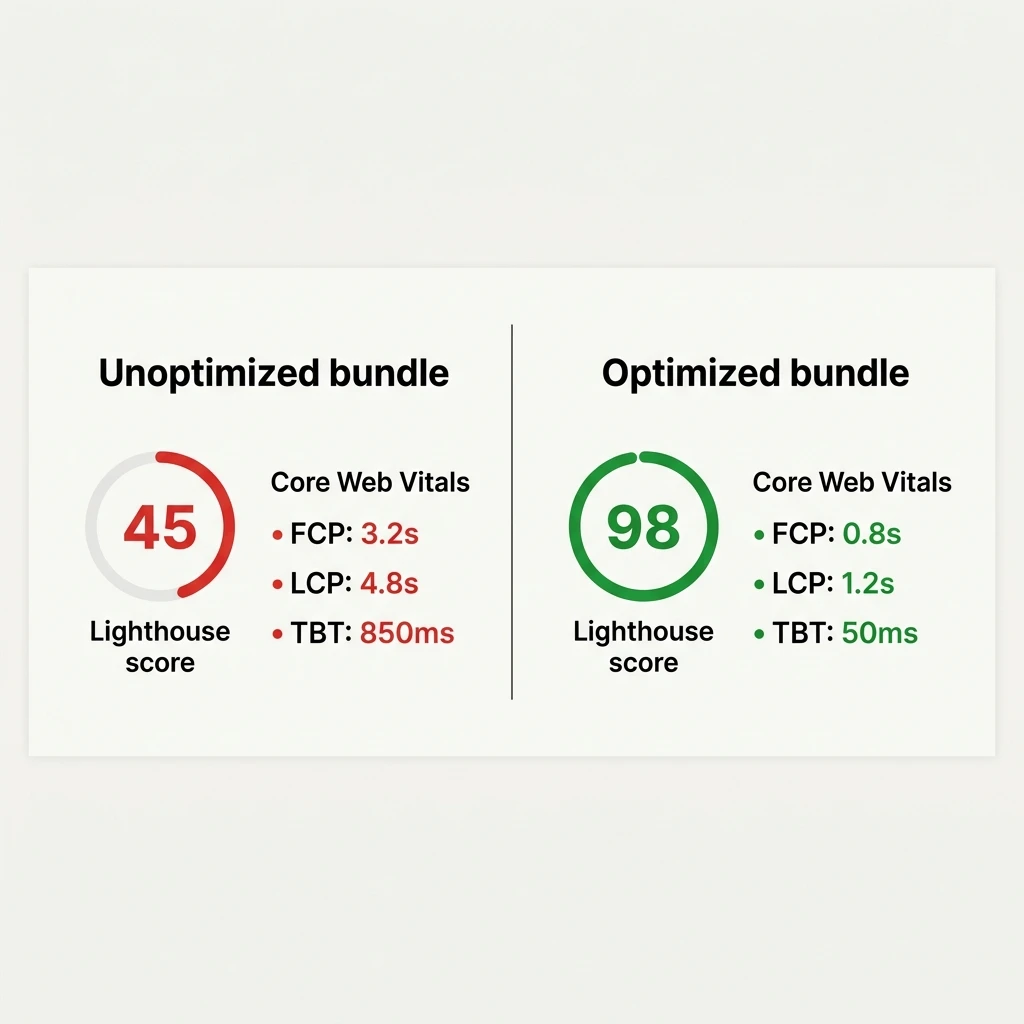
React applications built on standard Vite setups frequently score below 50 on mobile Lighthouse audits. This performance lag is rarely caused by React's rendering engine itself. Instead, it stems from default bundler configurations that generate oversized JavaScript chunks, blocking the browser's main thread and driving Total Blocking Time (TBT) into red metrics.
When you run npm run build in a standard Vite configuration, the bundler compiles all your dependencies into a single, massive index-[hash].js file. On high-bandwidth desktop connections, this file loads quickly. However, on mobile networks, downloading and parsing a 500KB bundle delays the First Contentful Paint (FCP) and stalls interactivity. We can fix this by introducing dynamic code splitting, custom asset mapping, and strict rendering controls.
1. The Vite Bundle Problem: Splitting Vendor Chunks
A key source of React application bloat is the inclusion of heavy third-party packages (like React DOM, Router, or animation libraries) inside the primary application bundle. When a user lands on your home page, they do not need to download the code for your entire app. They only require the dependencies that render that specific screen.
We can modify Vite's build settings to separate third-party vendor dependencies into distinct cached chunks. This is achieved by editing vite.config.ts and configuring Rollup's manual chunking options:
import { defineConfig } from 'vite';
import react from '@vitejs/plugin-react';

export default defineConfig({
  plugins: [react()],
  build: {
    rollupOptions: {
      output: {
        manualChunks(id) {
          // Group third-party node_modules dependencies
          if (id.includes('node_modules')) {
            if (id.includes('react') || id.includes('react-dom') || id.includes('react-router')) {
              return 'vendor-core';
            }
            if (id.includes('gsap') || id.includes('lenis')) {
              return 'vendor-motion';
            }
            return 'vendor-libs';
          }
        }
      }
    },
    chunkSizeWarningLimit: 600
  }
});
This configuration divides your compiled application assets into logical modules. Core library components (React and React Router) compile into vendor-core.js, scroll libraries (GSAP, Lenis) compile into vendor-motion.js, and all other lightweight libraries fall into vendor-libs.js. The browser can download these modules in parallel and cache them cache-control headers, ensuring repeat visits do not download unchanged dependencies.
2. Dynamic Routing & Component Lazy Loading
Splitting your vendor modules resolves library bloat, but your main application code still needs to be chunked. Every page route in your application should be loaded on demand. By default, importing routes statically bundles every component into one script. We can replace this with React's native lazy loading API.
The code below demonstrates how to configure your router so that users only request route-specific assets when navigating to that URL path:
import React, { Suspense, lazy } from 'react';
import { BrowserRouter as Router, Routes, Route } from 'react-router-dom';

// Lazy load layout and page components
const Home = lazy(() => import('./pages/Home'));
const Services = lazy(() => import('./pages/Services'));
const CaseStudies = lazy(() => import('./pages/CaseStudies'));

const LoadingFallback = () => (
  <div style={{ height: '100vh', display: 'flex', justifyContent: 'center', alignItems: 'center' }}>
    <span>Loading...</span>
  </div>
);

function App() {
  return (
    <Router>
      <Suspense fallback={<LoadingFallback />}>
        <Routes>
          <Route path="/" element={<Home />} />
          <Route path="/services" element={<Services />} />
          <Route path="/portfolio" element={<CaseStudies />} />
        </Routes>
      </Suspense>
    </Router>
  );
}

export default App;
Using dynamic import() statements signals Vite to split each page component into its own chunk during compilation. The browser only fetches the Home.js payload initially. The additional pages are retrieved in the background or during link navigation, reducing the initial loading payload by up to 75%.
3. Core Web Vitals Remediation: CLS, LCP, and TBT
While bundle splitting addresses load latency, achieving a 95+ score on Lighthouse requires resolving layout stability (Cumulative Layout Shift) and render speeds (Largest Contentful Paint).
Cumulative Layout Shift (CLS)
Layout shifts occur when the browser downloads assets (like images or dynamic ad blocks) and rearranges the surrounding elements on the screen. To eliminate this, always declare explicit height and width dimensions on your image containers or images:
<!-- BAD: Causes shift as the image downloads -->
<img src="/images/project.webp" alt="Client Portfolio" />

<!-- GOOD: reserves space on the DOM immediately -->
<img
  src="/images/project.webp"
  alt="Client Portfolio"
  width="1200"
  height="630"
  loading="lazy"
/>
Largest Contentful Paint (LCP)
Your hero banner image is typically the Largest Contentful Paint target. While lazy loading is recommended for images further down the page, you must not lazy load your hero banner. Instead, prioritize it using the fetchpriority attribute:
<!-- Preload critical LCP banner elements -->
<img
  src="/images/hero-banner.webp"
  alt="Hero Background"
  width="1920"
  height="1080"
  fetchpriority="high"
/>
Total Blocking Time (TBT)
TBT measures the duration between page interactivity and user input response. It is directly tied to JavaScript compilation times. By loading heavy modules lazily and deferring analytics wrappers (like Google Tag Manager) until after the main thread is idle, TBT scores can be pushed into the green range (under 150ms).
Key Performance checklist for React
- Never import entire icon libraries statically. Use tree-shaken imports.
- Avoid executing complex loops or state changes during the initial mount cycle.
- Compress all visual elements to WebP or AVIF formats.
4. Production Audits and Bundle Budgeting
Never rely on development servers when auditing performance metrics. Development builds contain hot reload wrappers and unminified source code maps that increase bundle sizes and skew metrics. Always test production bundles locally:
# Build production bundle
npm run build

# Serve compiled files locally
npx serve -s dist
Run your Lighthouse audits inside a private/incognito window to ensure extensions or developer caches do not affect measurements. Additionally, you should implement the rollup-plugin-visualizer plugin to constantly monitor module sizes and prevent bundle bloat as your codebase grows.
While optimization seems straightforward, structural routing conflicts and legacy package configurations can complicate efforts. Achieving search visibility requires pairing speed with indexability, which is why optimizing your build pipeline must sit alongside sound search architecture. Learn more about structural indexability in our companion article on React SPA SEO Best Practices.
If your business is losing conversions and ranking spots due to a slow, bloated website, we can help. At Pizzascript, we refactor codebases to achieve sub-second speeds. Learn more about our speed remediation process on our Website Speed Optimization Service page, or contact us directly to schedule a performance audit.